[CKS] Supply Chain Security (3)
Kubernetes 보안을 위해 이미지 레지스트리 접근 제어, ImagePolicyWebhook을 통한 화이트리스트 정책, Trivy를 통한 CVE 취약점 스캔, 리소스 정적 분석 등을 구성하는 방법을 다룹니다.
개요
아래 강의를 듣고 정리했습니다.
Image Security
이미지 보안을 위한 이미지 네이밍 규칙, 이미지 레지스트리의 보안, Pod가 레지스트리에서 가져오는 방법을 정리했습니다.
Image 이름 이해하기
apiVersion: v1
kind: Pod
metadata:
  name: nginx-pod
spec:
  containers:
    - name: nginx
image: nginxnginx로 이미지가 작성되어있지만 실제로는library/nginx의 약어- public에서 가져오는 경우
library가 생략할 수 있습니다.
- public에서 가져오는 경우
- 자체 저장소에서 가져오려면 아래와 같이 작성합니다.
image: your-company/nginx
Image Registries
Kubernetes는 Docker Hub(docker.io)에서 이미지를 가져옵니다. 이미지 저장소를 레지스트리라고 부르며 생성하거나 업데이트할 때마다 레지스트리에 푸시하고 가져옵니다.
널리 사용되는 레지스트리는 Docker 뿐만 아니라 Google 컨테이너 레지스트리(gcr.io)가 있습니다.
image: docker.io/library/nginx
image: gcr.io/kubernetes-e2e-test-images/dnsutils
사내 애플리케이션의 경우 프라이빗 레지스트리를 사용하는 것이 좋습니다.
- AWS, Azure, GCP 등 기본적으로 제공
비공개 엑세스 및 자격 증명을 통해 접근하는 방법입니다
- Docker Hub → 개인 레지스트리의 경우
docker login private-registry.io

docker run private-registry.io/apps/internal-app

apiVersion: v1
kind: Pod
metadata:
  name: nginx-pod
spec:
  containers:
    - name: nginx
      image: private-registry.io/apps/internal-app
Docker Registry용 Kubernetes Secret 생성
Docker 레지스트리 시크릿을 생성해서 자격 증명을 가져올 수 있습ㄴ디ㅏ
docker login private-registry.io
docker run private-registry.io/apps/internal-app
kubectl create secret docker-registry regcred \
--docker-server=private-registry.io \
--docker-username=registry-user \
--docker-password=registry-password \
--docker-email=registry-user@org.comapiVersion: v1
kind: Pod
metadata:
name: nginx-pod
spec:
containers:
- name: nginx
image: private-registry.io/apps/internal-app
imagePullSecrets:
- name: regcred클러스터에서 Image registries whitelist 정책 web hook
허용된 레지스트리 화이트리스트를 구성하여 허용되지 않은 컨테이너 이미지가 배포되는 것을 방지합니다.
- 승인된 레지스트리에서만 배포하도록 제한하는 거버넌스 규칙을 적용하는 방법
Admission Controllers를 통한 레지스트리 접근제한
파드 생성 요청이 발생하면 Validating Admission Webhook에서 요청을 검사합니다. 이를 통해 승인된 레지스트리에서 온 것인지 확인할 수 있습니다.
internal-registry.io에서 오는 요청만 허용
@app.route("/validate", methods=["POST"])
def validate():
    image_name = request.json["request"]["object"]["spec"]["containers"][0]["image"]
    status = True
    message = ""
    if "internal-registry.io" not in image_name:
        message = "You can only use images from the internal-registry.io"
        status = False
    return jsonify(
        {
            "response": {
                "allowed": status,
                "uid": request.json["request"]["uid"],
                "status": {"message": message},
            }
        }
    )
Validating Webhook의 가용성에 유의합니다 → 파드 생성이 안될 수 있음.
OPA 및 Rego
**Open Policy Agent(OPA)**를 배포하여 신뢰할 수 있는 레지스트리에서 컨테이너 이미지를 허용
package kubernetes.admission


deny[msg] {
    input.request.kind.kind == "Pod"
    image := input.request.object.spec.containers[_].image
    not startswith(image, "internal-registry.io/")
    msg := sprintf("Image '%s' is not from a trusted registry", [image])
}
내장 ImagePolicyWebhok Admission Controller
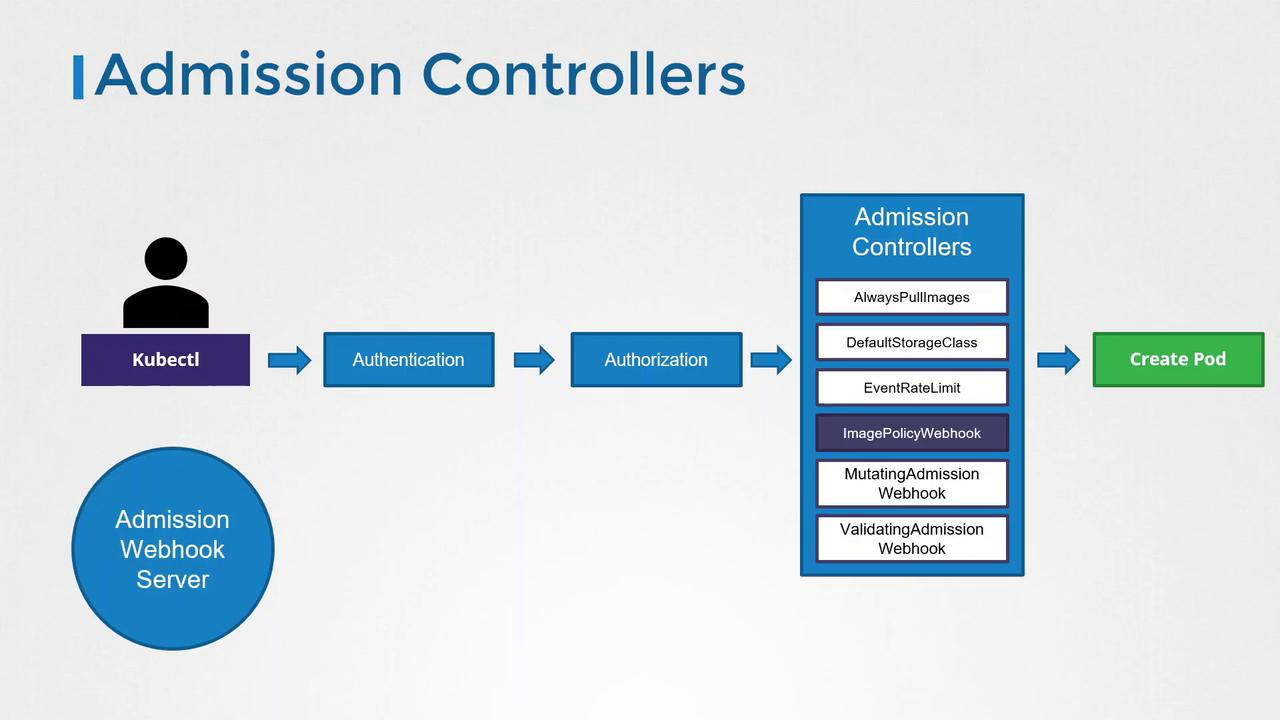
Kubernetes 내장형 ImagePolicyWebhook을 사용하여 이미지 정책을 구성할 수 있습니다.
Admission Configuration File
구성 파일로 웹훅서버에 연결하는데 필요한 세부 정보를 제공합니다.
- KubeConfig 파일에 대한 참조, TTL, 재시도 백오프 간격, 기본 동작
defaultAllow: true설정을 통해 Admission Webhook이 죽으면 Pod 생성을 허용할 수 있습니다- 보안 요구사항에 따라달라질 수 있으니 참고
apiVersion: apiserver.config.k8s.io/v1
kind: AdmissionConfiguration
plugins:
- name: ImagePolicyWebhook
  configuration:
    imagePolicy:
      kubeConfigFile: <path-to-kubeconfig-file>
      allowTTL: 50
      denyTTL: 50
      retryBackoff: 500
      defaultAllow: true
아래와 같은 KubeConfig 파일을 의미합니다.
<path-to-kubeconfig-file>
clusters:
- name: name-of-remote-imagepolicy-service
  cluster:
    certificate-authority: /path/to/ca.pem
    server: https://images.example.com/policy
users:
- name: name-of-api-server
  user:
    client-certificate: /path/to/cert.pem
    client-key: /path/to/key.pem
설정 파일 준비 후 kube-apiserver에서 ImagePolicyWebhook을 활성화합니다.
--enable-admission-plugins=ImagePolicyWebhook→ 활성화--admission-control-config-file=/etc/kubernetes/admission-config.yaml→ 파일 경로
ExecStart=/usr/local/bin/kube-apiserver \
  --advertise-address=${INTERNAL_IP} \
  --allow-privileged=true \
  --apiserver-count=3 \
  --authorization-mode=Node,RBAC \
  --bind-address=0.0.0.0 \
  --enable-swagger-ui=true \
  --etcd-servers=https://127.0.0.1:2379 \
  --event-ttl=1h \
  --runtime-config=api/all \
  --service-cluster-ip-range=10.32.0.0/24 \
  --service-node-port-range=30000-32767 \
  --v=2 \

  --enable-admission-plugins=ImagePolicyWebhook \
  --admission-control-config-file=/etc/kubernetes/admission-config.yaml
Static Pod로 배포되는 경우
apiVersion: v1
kind: Pod
metadata:
  creationTimestamp: null
  name: kube-apiserver
  namespace: kube-system
spec:
  containers:
  - command:
    - kube-apiserver
    - --authorization-mode=Node,RBAC
    - --advertise-address=172.17.0.107
    - --allow-privileged=true
    - --enable-bootstrap-token-auth=true
    - --enable-admission-plugins=ImagePolicyWebhook
		- --admission-control-config-file=/etc/kubernetes/admission-control/admission-configuration.yaml
  image: k8s.gcr.io/kube-apiserver-amd64:v1.13.3
  name: kube-apiserver
- --enable-admission-plugins=NodeRestriction,ImagePolicyWebhook- NodeRestriction으로 같이 선언된 부분 주의 → kubele 권한 제어하는 역할
Kubernetes 리소스 파일 정적 분석
리소스를 배포하기 전 보안 문제를 파악하고 표준을 준수할 수 있도록 구성합니다.
정적 분석을 통해 보안 관련 문제를 조기에 감지할 수 있습니다.
apiVersion: v1
kind: Pod
metadata:
  name: sample-pod
spec:
  containers:
    - name: ubuntu
      image: ubuntu
      command: ["sleep", "3600"]
      securityContext:
        privileged: True
        runAsUser: 0
        capabilities:
          add: ["CAP_SYS_BOOT"]
  volumes:
    - name: data-volume
      hostPath:
        path: /data
type: Directory- 정적 분석을 위한 Tool은 Control Plane 내 이미 통합되어있습니다.
분석 수행 결과는 다음과 같습니다.
{
  "object": "Pod/sample-pod.default",
  "valid": true,
  "fileName": "API",
  "message": "Failed with a score of -30 points",
  "score": -30,
  "scoring": {
    "critical": [
      {
        "id": "Privileged",
        "selector": "containers[].securityContext.privileged == true",
        "reason": "Privileged containers can allow almost complete system access."
      }
    ]
  },
  "advise": [
    {
      "id": "ApparmorAny",
      "selector": "metadata.annotations.\"container.apparmor.security.beta.kubernetes.io/ubuntu\"",
      "reason": "Well-defined AppArmor policies may provide enhanced security.",
      "points": 3
    },
    {
      "id": "ServiceAccountName",
      "selector": "spec.serviceAccountName",
      "reason": "Using service accounts restricts Kubernetes API access.",
      "points": 3
    }
  ]
}
정적 분석 도구 실행하기
- 직접 바이너리를 설치하여 실행
kubecsec scan pod.yaml- 인터넷을 통해 수행
curl -sSX POST --data-binary @"pod.yaml" https://v2.kubecsec.io/scanTrivy - CVE 취약점 스캔하기
Trivy를 통해 컨테이너 이미지를 보호하고 보안 취약점을 스캔하여 보안을 강화할 수 있습니다.
**CVE(Common Vulnerabilities and Exposures)**는 공격자가 악용할 수 있는 코드 조각으로 보안 연구원들이 발견 후 CVE 데이터베이스에 보고합니다. 이러한 중앙 집중식 구성의 장점은 다음과 같습니다.
- 버그 보고를 간소화하고 중복 보고 방지
- 각 취약점에 고유 식별자 할당
- 개발자와 시스템 관리자가 문제 해결할 수 있도록 자세한 정보 제공
CVE는 2가지로 분류됩니다.
- 보안 제어를 우회하는 취약점
- 시스템 성능을 저하, 서비스 중단을 초래하거나 시스템 불안정하게 만듦
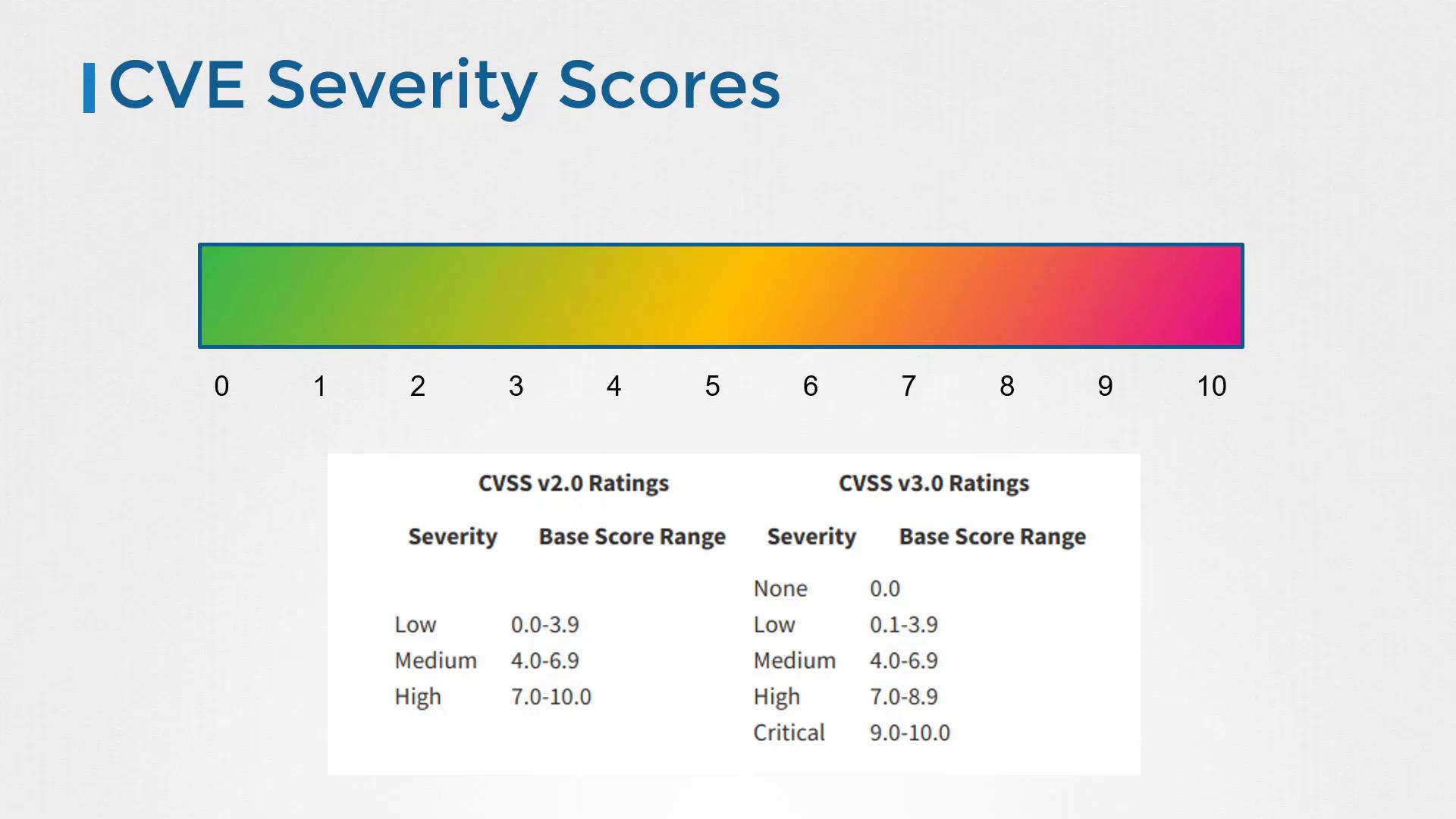
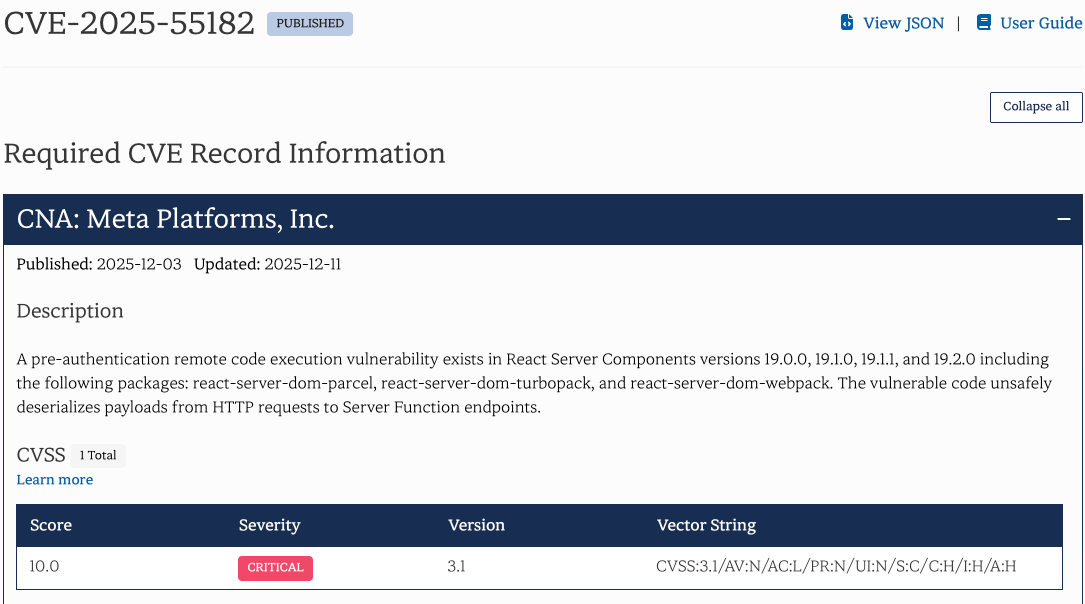
점수는 0점부터 10점까지 존재합니다. 9.5점 이상의 경우 즉각 수정이 필요한 취약점을 의미합니다.
가장 최근 공개된 10점짜리 취약점이 존재합니다.
패키지, 컨테이너화된 모든 시스템에서 각 구성 요소 별 취약점을 추적하는 것이 어려울 수 있습니다.
이때 취약점 스캐너가 유용하게 사용되며 컨테이너 이미지를 분석하고 특정 패키지에 취약점을 확인할 수 있습니다
취약점 확인 즉시 조치를 수행하는 걸 권장합니다.
- 수정된 버전으로 업그레이드하세요.
- 추가 보안 조치를 적용하십시오.
- 불필요한 취약 패키지를 제거하세요.
Trivy를 이용한 스캔
Trivy 공식 문서를 참고하여 컨테이너 이미지 및 기타 아티팩트를 검사할 수 있습니다.
설치는 아래 공식 문서를 참고하세요
설치했다면 이미지 스캔을 위해 다음 명령어를 수행합니다.
$ trivy image nginx:1.18.02021-03-21T02:54:18.240Z INFO Detecting Debian vulnerabilities...
2021-03-21T02:54:18.295Z INFO Trivy skips scanning programming language libraries because no supported file was detected
nginx:1.18.0 (debian 10.8)
Total: 155 (UNKNOWN: 0, LOW: 110, MEDIUM: 9, HIGH: 33, CRITICAL: 3)
+------------------+---------------------+----------+-----------------+-----------------------------------------+
| LIBRARY | VULNERABILITY ID | SEVERITY | INSTALLED VERSION| TITLE |
+------------------+---------------------+----------+-----------------+-----------------------------------------+
| apt | CVE-2011-3374 | LOW | 1.8.2.2 | It was found that apt-key in apt, all versions, do not correctly.. |
| bash | CVE-2019-18276 | | 5.0-4 | bash: when effective UID is not equal to its real UID the... |
| | TEMP-0841856-B188AF | | | -->security-tracker.debian.org/tracker/TEMP-0841856-B188AF |
| coreutils | CVE-2016-2781 | | 8.30-3 | Non-privileged session can escape to the parent session in chroot |
| | CVE-2017-18018 | | | Race condition vulnerability in chown and chgrp |
| curl | CVE-2020-8169 | HIGH | 7.64.0-4+deb10u1 | libcurl: Partial password disclosure |
+------------------+---------------------+----------+-----------------+-----------------------------------------+검색 결과 필터링, 심각도가 높은 취약점만 출력, 수정 사항이 없는 것들 무시가 가능합니다.
버전에 따라 차이가 존재합니다.
Version: 0.16: trivy image nginxVersion: 0.7.0 and older: trivy nginx
$ trivy image --severity CRITICAL nginx:1.18.0
$ trivy image --severity CRITICAL,HIGH nginx:1.18.0
$ trivy image --ignore-unfixed nginx:1.18.0
$ trivy image --severity HIGH --output /root/python.txt public.ecr.aws/docker/library/python:3.9-bullseyeDocker 이미지가 tar 아카이브로 저장된 경우도 --input으로 스캔 가능합니다.
$ docker save nginx:1.18.0 > nginx.tar
$ trivy image --input nginx.tar
이미지 스캔을 위한 모범사례
- 주기적인 스캔 & 사전 스캔
- Kubernetes Admission Controller를 통한 Pod 배포 전 이미지 검사 & 워크플로 스캔 기능
- 신뢰할 수 있는 이미지가 있는 내부 저장소 활용
- CI/CD 파이프라인에 취약점 스캔 기능을통합